Custom parameters
A custom parameter is a URL parameter you define yourself, next to the standard UTMs: ?mycrmparameter=springsale alongside utm_campaign and the rest. You create it in the setup wizard's syntax builder on the custom parameter tab, and it behaves like a first-class citizen:
- Own name and label: the parameter name goes into the URL; the display name titles its step in the builder.
- Own structure: like
utm_campaign, it is composed of one or more fields joined by a separator you choose. - Own step: the builder inserts a wizard step for it, and its fields validate like any standard field.
Typical uses: a CRM campaign code, an internal reporting id, a partner or affiliate tag, anything downstream systems parse out of your landing URLs.
Creating a custom parameter, step by step
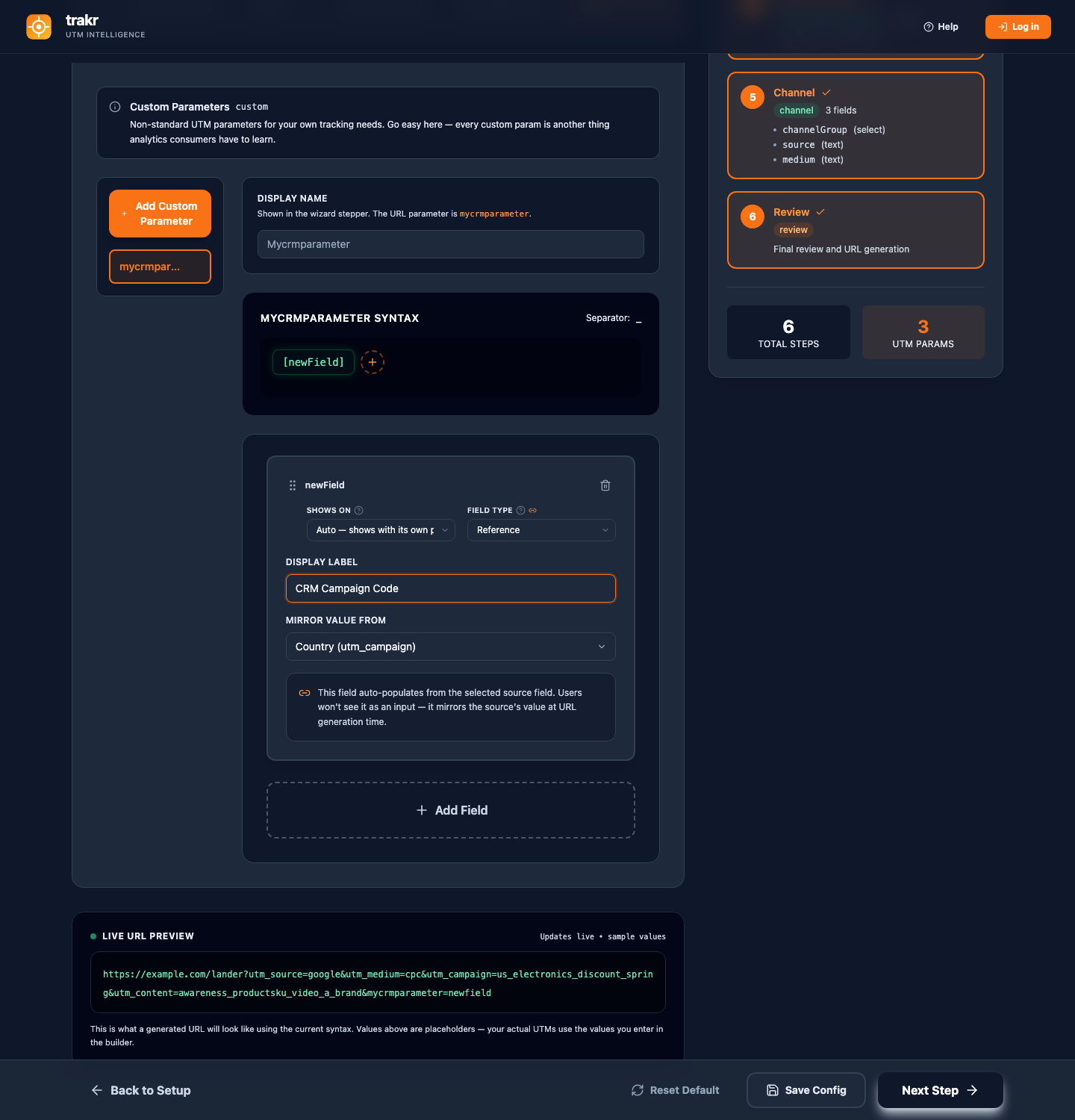
- Open Reconfigure Setup and go to the Configure Syntax step.
- Switch to the Custom Parameters tab and add a new parameter.
- Set the parameter name (this goes into the URL, for example
mycrmparameter) and the display label (this titles its step in the builder). - Add fields to its structure the same way you build
utm_campaign: each field has a type, and the separator joins them in order. - Finish Setup. The syntax builder's field checks gate this step, and the deeper flow validation (ghost fields, reference targets) guards every configuration write through the API and MCP, where an invalid document is refused with the exact errors.
The seven field types
Every field in a syntax structure (standard or custom parameter) has one of seven types:
| Type | Behavior in the builder |
|---|---|
| Select | Dropdown of allowed values; can be multi-select with its own delimiter. |
| Text | Free input, validated against characters that would break the syntax. |
| Date | Date picker. |
| Constant | A fixed value, always emitted, never asked for. |
| Channel-linked | Bound to the selected channel's brand behavior; used for the brand type field, once per configuration. See Brand type. |
| Auto ID (generated) | A unique 8-character link id minted fresh for every URL, once per configuration. Powers per-link lookups through the API. See Campaign IDs & Lean URLs. |
| Reference | Mirrors another field's value automatically. Read on. |
Reference fields: enter once, reuse everywhere
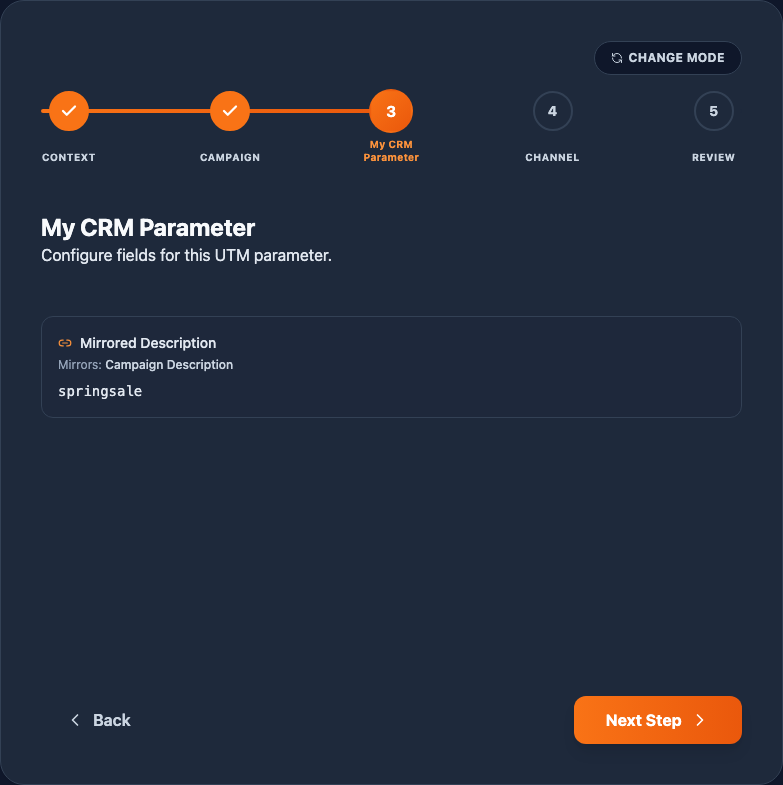
A reference field never asks for input. You pick a source field when you configure it, and at build time it carries whatever the source field holds. In the builder it renders as a read-only card naming its source and showing the live mirrored value.
The classic setup: your CRM parameter must contain the same value as the campaign description inside utm_campaign. Without references you would type it twice and eventually the two would drift. With a reference, the description is entered once on the campaign step and the CRM parameter picks it up automatically, on every URL, including every row of a bulk batch.
Setting up a reference, step by step
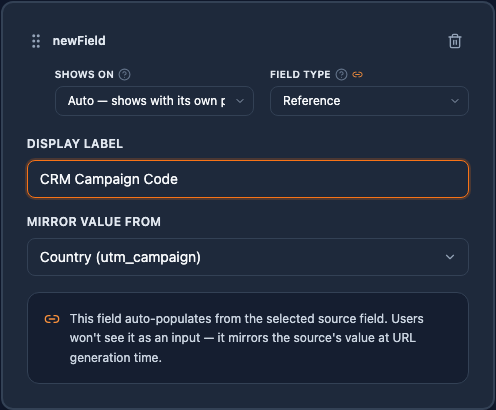
- In any structure, on a standard parameter or a custom one, add a field and give it a label.
- Set its Field Type to Reference.
- A Mirror value from dropdown appears. It lists every eligible source with its home parameter, for example Campaign Description (utm_campaign). Your own reference and other reference fields are excluded automatically.
- Pick the source and save. In the app, a mirror without a source is never populated, so pick the source right away; the flow validation that guards API and MCP configuration writes refuses an unselected source outright.
The rules
- Any source except another reference. Text, selects, dates, constants, even the channel-linked brand field can be mirrored. Reference-to-reference chains are refused by validation, which keeps value flow single-hop and cycle-free.
- Never editable, never overridable. The builder shows it read-only, and bulk rows cannot override it directly. That is the guarantee: if a bulk row overrides the source field, the row's reference follows the override on its own.
- Required is satisfied by the source. A reference is filled exactly when its source is filled, so the builder gates on the source field, not the mirror.
Where to build all this: the syntax builder's tabs (standard parameters, custom parameters, field types, separators) are covered on the Syntax builder page.