Two mechanisms, one concept
Brand type answers one reporting question: was this click on a brand campaign or a non-brand campaign? Trakr implements it with two pieces that meet in the middle:
- The brand type field lives in your syntax, and Trakr derives classification from wherever you place it: any standard parameter or a custom one.
utm_campaignandutm_contentstay the recommended home because they are the naming parameters, the free-text dimensions where a brand marker reads naturally and that GA4's own channel group rules can read back. Its type is Channel-Linked and its value is alwaysbrandornon-brand. You never type into it on a parameter step. - Each channel's brand behavior (set on the Channel Definitions step) decides that value for every URL built through the channel.
The one-sentence version: the channel you pick fills the brand type field. You define the channel's behavior once in setup; the builder handles the rest.
The three brand behaviors
| Behavior | What the builder shows | Typical channels |
|---|---|---|
| Brand | A locked chip reading "brand, locked by channel". No input needed. | Paid Search, Brand |
| Non-brand | A locked chip reading "non-brand, locked by channel". | Paid Search, Non-Brand; Display |
| User decides | A brand / non-brand toggle on the Channel step of the builder. | Paid Social, Email, channels that run both kinds of campaigns |
In bulk mode the same logic applies per row: rows for forced channels carry the locked chip; rows for user-decided channels get the toggle, defaulting to non-brand.
Where the value lands
Wherever the brand type field sits in your syntax. With utm_content = funnel_creative_brandType and _ as the separator, a brand click emits ...&utm_content=awareness_video_brand. Downstream, that token is what your GA4 custom dimensions or channel grouping rules can key on.
Classification is derived, no rules to write
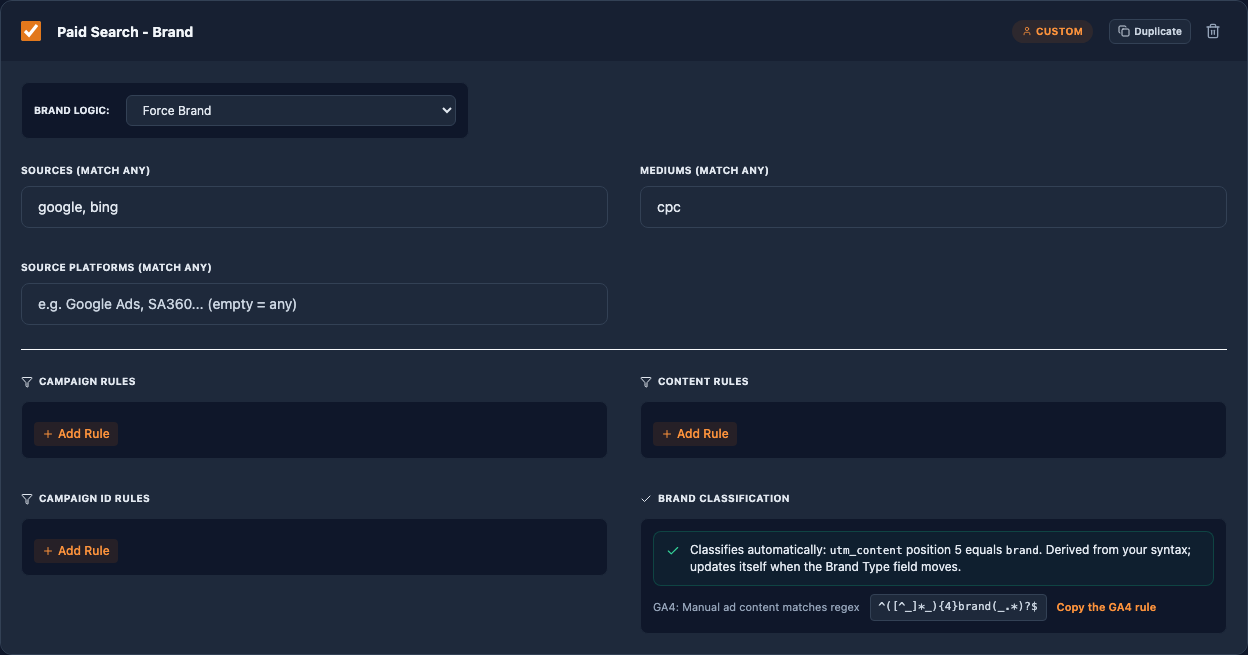
Trakr knows exactly where your brand type field sits: which parameter, which position, which separator. So a custom channel with Brand Logic set to Force Brand or Force Non-Brand classifies URLs automatically by comparing that exact position of the generated value. The channel card shows what it derived, and the line updates itself if you ever move the field. The comparison is exact by design: brand is contained in non-brand, so anything looser would misclassify every non-brand URL.
If a brand-classifying channel exists but your syntax has no brand type field yet, the card says so and the channel stays out of channel prediction until you add one; it never guesses.
The GA4 side: one rule to copy
Trakr's own prediction handles your preview and history. Your GA4 property still needs its custom channel group rule, so the channel card offers Copy the GA4 rule: the exact position-anchored pattern for your current syntax, for example ^([^_]*_){2}brand(_.*)?$ for a brand token in position 3. It is written to match the entire value, so it works whether GA4 evaluates the rule as a full or a partial match, and it uses no regex features GA4's engine lacks. When your syntax changes, copy it again; the pattern follows the field.
Why the dropdown option is greyed out
In the field type dropdown, Channel-Linked (Brand) is disabled on every other field once one channel-linked field exists. One configuration gets exactly one channel-linked field; the flow validator enforces it. This is protection: two fields bound to the same channel selection would fight over one value.
Setting it up from zero
- In the syntax builder, give a field the Channel-Linked (Brand) type, or use the
brandTypefield a template ships. Place it in a parameter structure, typicallyutm_content. - On the Channel Definitions step, set each channel's brand behavior: brand, non-brand, or user decides.
- Build a URL. Forced channels show the locked chip; user-decided channels show the toggle. The emitted value follows your choice.
Brand behavior is not a rule
Channels also carry campaign and content rules (contains and regex checks). Those validate the final parameter values; they do not set the brand type. If a rule looks like it references brand, it is checking your output for compliance. The brand behavior setting alone decides what the brand type field emits.