The idea
In single mode you build one URL end to end. In bulk mode you describe the campaign once (the same context, campaign, and content steps as always) and then fan it out: pick channels, and each channel becomes a row that turns into its own URL. Everything the rows share comes from your one brief, which is exactly what keeps utm_campaign and utm_content identical across channels in GA4.
Start it from the builder's mode screen: Create Multiple URLs. It is part of Pro; Free accounts see the mode with an upgrade prompt.
The channel step: rows
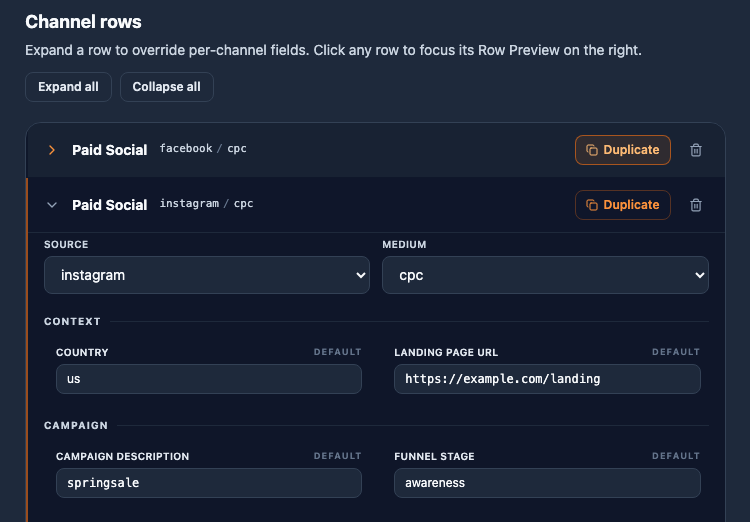
Tick the channels you want; each becomes a row below. Rows resolve their source and medium from the channel definition: a single allowed value renders as a fixed chip, several as a dropdown, none as a free text input.
Per-row overrides
Expand a row to override regular fields for that row only: any field from the earlier steps (except constants and a few special types) can take a row-specific value. The collapsed header summarizes a row's overrides so you can scan the whole batch at a glance. Where the channel allows a brand choice, the row also carries its own brand toggle.
Duplicate: variants of one channel
One campaign often needs several URLs on the same channel that differ in one detail: google and bing on Paid Search, four creatives on Display. Every row header carries a Duplicate button, visible even while collapsed. It clones that exact row (source, medium, overrides, brand setting), inserts the copy directly below, and opens it ready to edit. The bin removes a row once its channel has more than one; a channel's last row is removed by unticking the channel.
The preview on the right
In bulk mode the panel is a row preview, not a batch preview. It follows your focus: it always shows the row you last clicked or edited, broken down parameter by parameter, so you can verify one URL in detail while you work. The complete list appears on the Review step: one URL per row with its GA4 channel prediction, before anything is generated.
Generate: one batch
Generating writes one URL per row into your history as a single batch:
- The Library shows the batch as one card with a URL count and a channel pill per row; loading it seeds the wizard from the first row.
- In Generated History the rows carry a batch icon that filters the table to the batch, where Copy N URLs and Export batch as CSV handle the whole set at once. Details on the History & Library page.
Channels are the fan-out axis. How channel definitions decide sources, mediums, and GA4 grouping is covered on the Channels page; the brand toggle's rules live on the Brand type page.