Why channels exist
GA4 sorts traffic into channel groups (Paid Search, Paid Social, Email, and 16 more) based on the source and medium values in your URLs. When a URL carries a combination GA4 does not recognize, the session lands in Unassigned and your channel report goes dark. A Trakr channel bundles the source and medium combinations you allow for one traffic type, so every generated URL lands in the right GA4 bucket.
What a channel contains
- Sources: the allowed
utm_sourcevalues, for examplegoogleandbingfor Paid Search. One source renders as a fixed chip in the builder; several render as a dropdown. - Mediums: the allowed
utm_mediumvalues, same rules. - Brand behavior: whether this channel forces the brand type value, forces non-brand, or lets the user decide per URL. Full story on the brand type page.
- Campaign and content rules: pattern checks (contains, regex) validated against the generated parameter values. These are guardrails for classification, separate from brand behavior.
- Campaign ID rules and source platforms: the same idea for the remaining GA4 dimensions. Campaign ID rules pattern-match the generated
utm_id; source platforms are a match-any list againstutm_source_platform(for example Google Ads or SA360). Both are optional; empty means any. - Active toggle: inactive channels stay configured but disappear from the builder's pickers.
Templates and your channel list
A template seeds only its own channel set: the E-commerce template ships 8 channels, so the builder offers exactly those 8. Trakr knows all 19 standard GA4 channel definitions, including native Paid Search (long part of GA4's list, added to Trakr's built-in set in July 2026) and AI Assistants, GA4's 2026 addition. Start from Scratch includes all 19 plus two ready-made custom channels, Paid Search Brand and Paid Search Non-Brand. The full checked list is below. You can add further channels on the Channel Definitions step at any time with Add Custom Channel.
Standard and custom channels
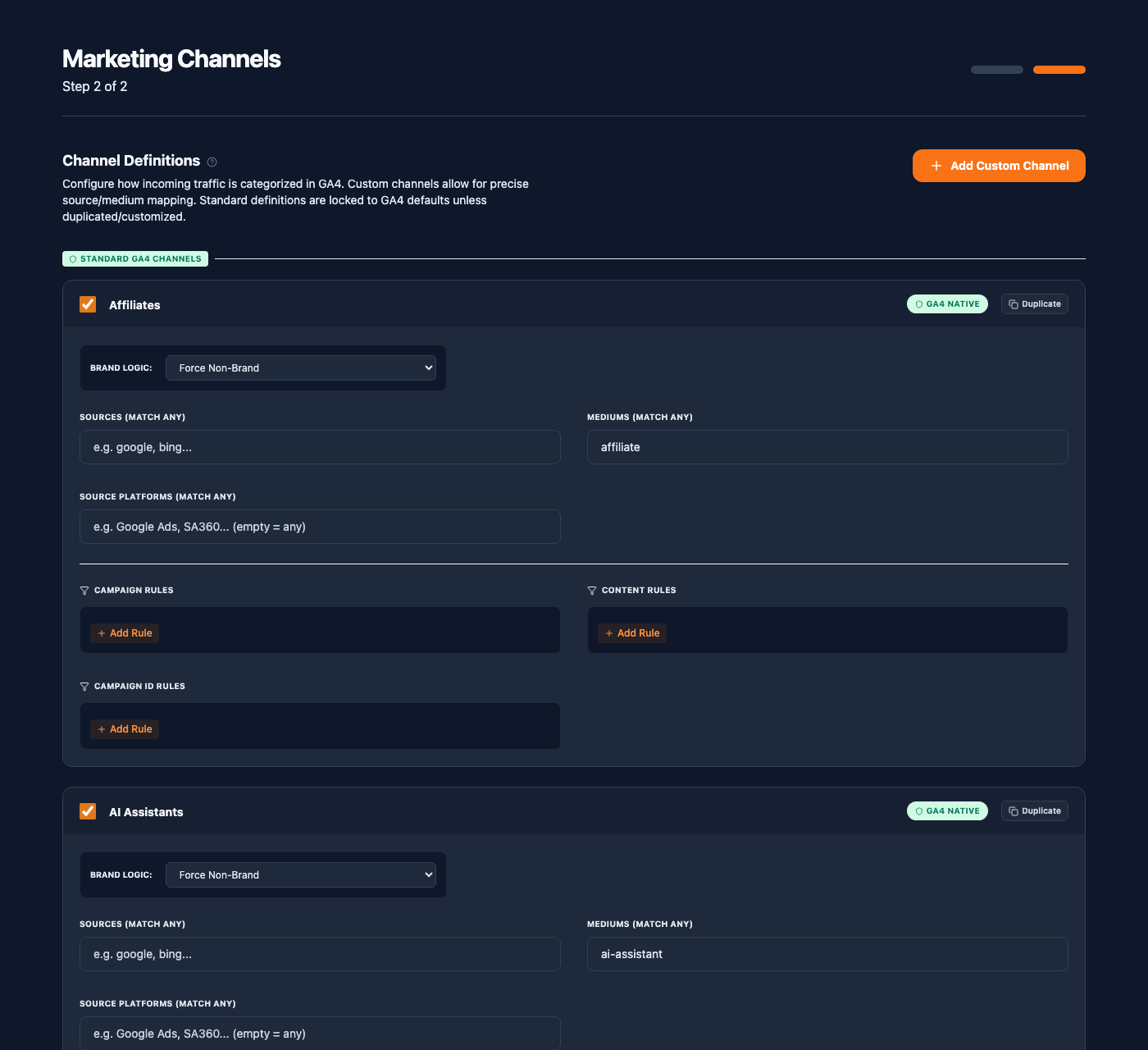
The Channel Definitions step groups your list into two sections:
- Standard GA4 Channels arrive matching GA4's default definitions and carry a GA4 badge. Their sources, mediums, brand logic, and rules are editable in place; the channel name is fixed because it maps to a GA4 channel group. Edit one and Trakr marks it as modified so you can see where you diverge from the GA4 default.
- Custom Channels are fully yours: name, sources, mediums, brand behavior, rules. Create one with Add Custom Channel, or take over a standard definition with Convert to Custom on its card, which moves it into the Custom section (after a confirming click) so you can rename it and treat it as your own, for example a "Paid Search - Brand" split.
Duplicate on any card clones the channel; the clone of a standard channel is a custom one you can rename.
The full channel list, checked against GA4
This is every channel a Start from Scratch configuration ships with, covering all 19 GA4 default channel groups per Google's own documentation, plus two custom channels: Trakr additions that split paid search traffic by brand intent.
Two matching details to know. Classification is substring based, so a source or medium that contains a listed value counts as a match; that keeps values like google.com resolving to the right channel. And when a channel lists both sources and mediums, a URL must match both; GA4's organic definitions accept either one, so Trakr is the stricter of the two there. Every rule below stays editable per channel.
| Channel | Origin | A URL matches when |
|---|---|---|
| Direct | GA4 standard | source is (direct) and medium is (not set) or (none) |
| Cross-network | GA4 standard | the campaign name contains cross-network |
| Paid Shopping | GA4 standard | medium is cpc, ppc, or paid and the campaign name matches GA4's shop pattern |
| Paid Search | GA4 standard | source is google, bing, yahoo, baidu, yandex, or duckduckgo and medium is cpc, ppc, or paid |
| Paid Social | GA4 standard | source is facebook, instagram, linkedin, tiktok, pinterest, snapchat, twitter, or x and medium is cpc, ppc, or paid |
| Paid Video | GA4 standard | source is youtube, vimeo, or dailymotion and medium is cpc, ppc, or paid |
| Display | GA4 standard | medium is display, banner, expandable, interstitial, or cpm |
| Paid Other | GA4 standard | medium is cpc, ppc, or paid and no paid channel above claimed the URL |
| AI Assistants | GA4 standard (2026) | medium is ai-assistant, any source. GA4 uses this medium for traffic from ChatGPT, Gemini, Copilot, Deepseek, and Grok; Google's AI Overviews stay in Organic Search |
| Organic Shopping | GA4 standard | the campaign name matches GA4's shop pattern, any source and medium |
| Organic Social | GA4 standard | source is a social site (the Paid Social list plus reddit) and medium is social, social-network, social-media, sm, social network, or social media |
| Organic Video | GA4 standard | source is youtube, vimeo, or dailymotion and medium is video |
| Organic Search | GA4 standard | source is a search site (the Paid Search list plus aol and ask) and medium is organic |
| GA4 standard | source or medium contains email | |
| Affiliates | GA4 standard | medium is affiliate |
| Referral | GA4 standard | medium is referral |
| Audio | GA4 standard | medium is audio |
| SMS | GA4 standard | source or medium contains sms |
| Mobile Push Notifications | GA4 standard | medium is push, mobile, or notification |
| Paid Search Brand | Trakr custom | the Paid Search match, and your syntax's Brand Type position equals brand (derived, no rule to write) |
| Paid Search Non-Brand | Trakr custom | the Paid Search match, and your syntax's Brand Type position equals non-brand (derived) |
The two custom channels classify by the brand type field's exact position in your syntax, derived automatically for any separator. Without a Brand Type field in the configuration they stay out of channel prediction entirely, so they can never claim traffic they cannot verify.
Unassigned is deliberately missing from this list. It is what GA4 reports when a URL matches nothing, and preventing it is the point of the whole setup.
Which parameters can route a channel
GA4 custom channel groups accept rules on exactly seven traffic dimensions: source, medium, campaign name, campaign ID, manual ad content (utm_content), source platform, and the default channel group itself. Trakr channel rules match on six of them: sources, mediums, campaign name rules, content rules, campaign ID rules, and source platforms. The seventh, the default channel group itself, is deliberately absent; Trakr's channels are the grouping, so matching on it would be circular.
These dimensions also frame where the brand type field best lives. Trakr derives brand classification from wherever the field sits, any parameter including a custom one, and the built-in Paid Search Brand and Non-Brand splits carry no hand-written rules at all. utm_campaign and utm_content stay the recommended home because they are the free-text naming dimensions GA4's own channel group rules can read back; campaign ID and source platform carry structured identifiers, so a naming marker reads wrong there.
One GA4 quirk ships as designed: GA4's shopping definitions match on the campaign name alone, with no medium condition. A campaign named summer-shopping routes to a Shopping channel even for an email send or an AI assistant link, in Trakr exactly as in GA4. If your campaign names hit the shop pattern and you do not sell products, edit the campaign rules on the two Shopping channels once and the quirk is gone.
Channels in the builder
In single-URL mode, the Channel step is one picker: choosing the channel sets the allowed sources and mediums, and the brand behavior either fills the brand type field or hands you the toggle.
Bulk mode: one row per channel
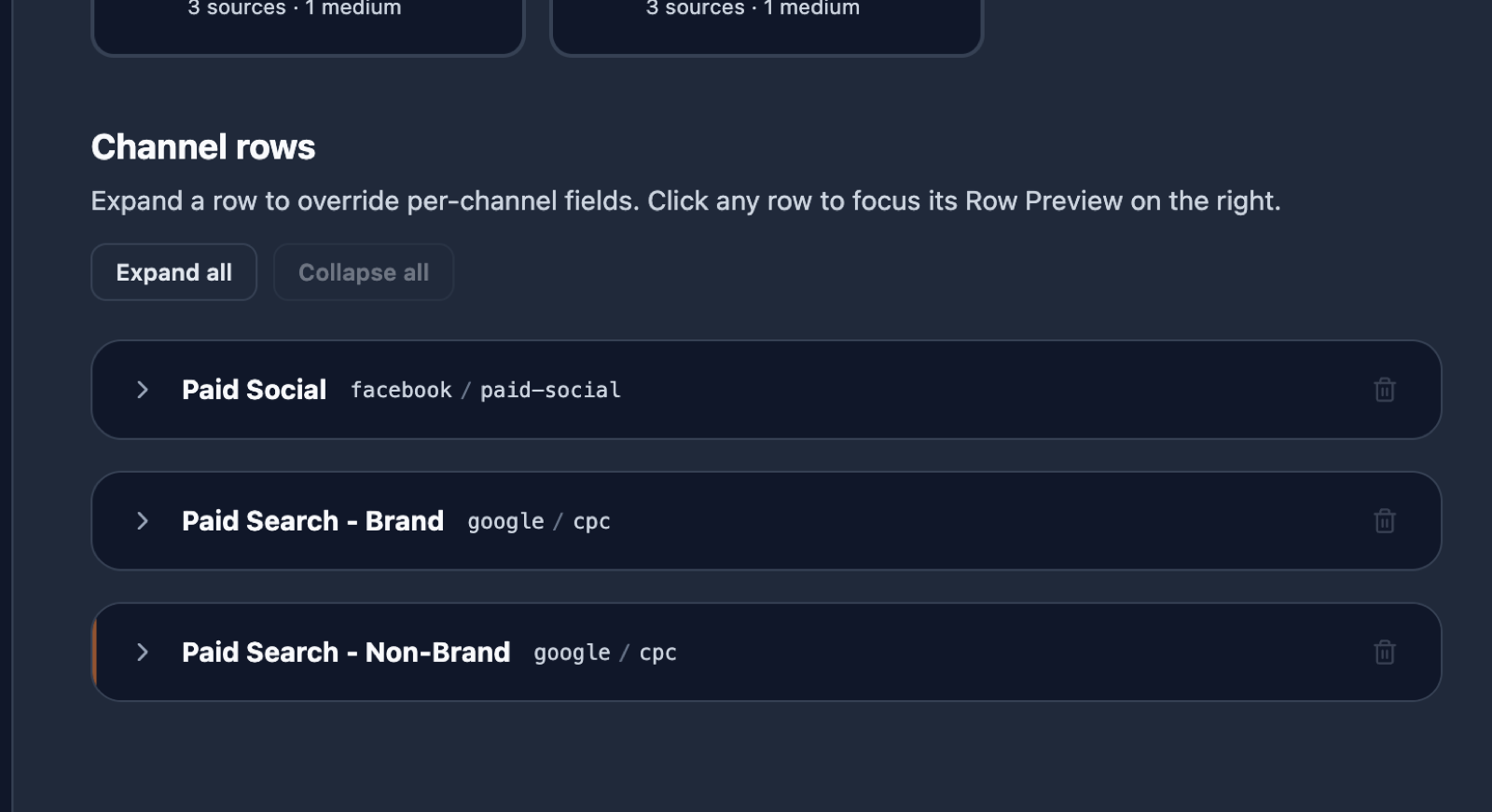
Create Multiple URLs (Pro) turns each selected channel into a row. Expand a row to set its source, medium, and per-row field overrides. Two controls matter most:
- Duplicate: every row header carries a Duplicate button, visible even while the row is collapsed. It clones that exact row, including its source, medium, field overrides, and brand setting, and inserts the copy right below it. The copy opens expanded and focused, ready to edit.
- Removing rows: the bin icon appears once a channel has two or more rows. A channel's last row is removed by unchecking the channel in the picker above.
Variants: several URLs for one channel
The idea behind duplicating: one campaign often needs several URLs that differ in a single detail. Two Paid Search rows for google and bing, or four Display rows for four creatives. Duplicate the row as many times as you need variants, then change only what differs per row. Everything else, the campaign context, the syntax, the channel rules, stays identical across the set, which is exactly what keeps the naming consistent in GA4.
About the preview on the right: in bulk mode it is a row preview, not a batch preview. It follows your focus and always shows the row you last clicked or edited, so you can inspect one URL in detail while you work. It is not showing "only the last URL" by mistake: the complete list, one URL per row, appears on the Review step before you generate.
Generating writes one URL per row into your history as a single batch; the Library shows the batch as one card with a per-row channel list. The full bulk workflow, including per-row overrides and batch handling in the history, has its own page: Bulk Builder.