What webhooks do
A Trakr webhook is an outbound HTTP POST. Whenever a tracking record changes, Trakr sends a small JSON note to a URL you registered. A record is one set of UTM parameters, with or without a landing URL: exactly what the builder, the API, and the MCP connector all produce. You do not poll Trakr for changes; Trakr pushes them to you.
Capture happens at the database level, which is the important part. A record created in the app, one written through the API, and one edited over the MCP connector all raise the same event. There is no surface you can change a record from that the webhook misses. Three things happen to a record, and each one sends a note:
- A record is created. Someone generates a URL, or a batch run adds rows.
- A record is edited. Any field on the record changes, and its generated values are rebuilt.
- A record is deleted. The record moves to Recently deleted, and Trakr tells you its id is gone.
Trakr is the sender in this relationship. You bring the receiver: any endpoint that accepts an HTTP POST works, including an n8n webhook URL, a small serverless function, or a route in your own service.
Setting up a webhook
Open Settings, go to the Webhooks section, and register the URL that should receive the notes. Trakr posts to that URL from the moment the webhook is enabled.
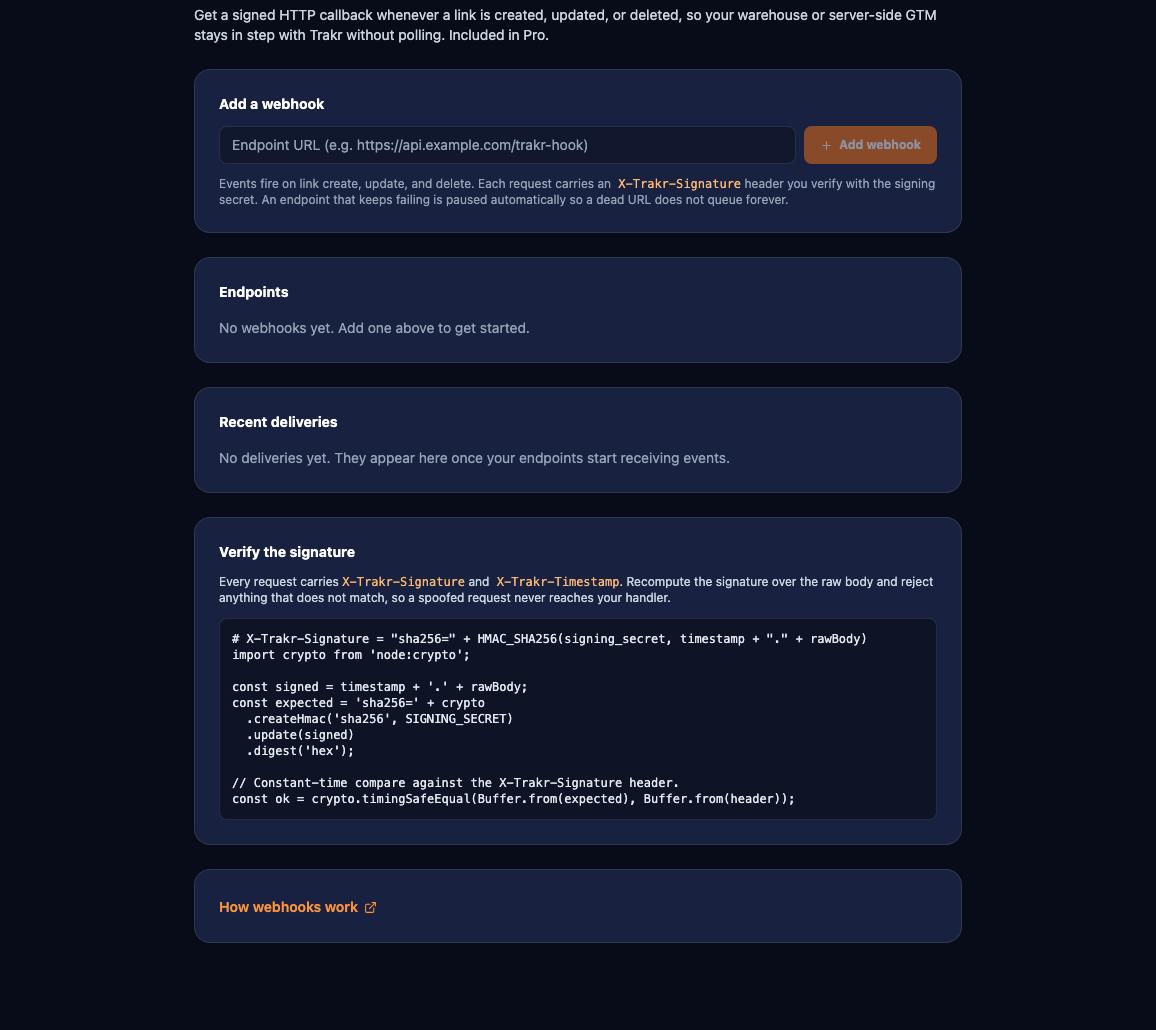
- Paste your receiving URL. If you run automations in n8n, a Webhook node gives you a URL you can drop straight in.
- On create, Trakr shows a signing secret once. Copy it into your secrets store immediately: it is how you prove each note is genuine, and it is never shown again.
- Save. New changes to your records now arrive at your endpoint as they happen.
The webhook reports changes from when it is enabled, not your back catalogue. Records that already exist do not replay. Seed your first copy with one bulk read (see below), then let the webhook keep it current.
What each note looks like
Every note is a JSON object with a stable envelope:
{
  "id": "evt_7c9e6679",
  "delivery_id": "dlv_5f0a12b8",
  "type": "record.created",
  "created_at": "2026-07-21T10:15:00.000Z",
  "data": { ... }
}| Field | Meaning |
|---|---|
id | The event id. Stable and unique per change. Use it, or delivery_id, to discard a repeat. |
delivery_id | The id of this delivery attempt. Because delivery is at-least-once, the same event can arrive twice with the same event id; dedupe on it. |
type | One of record.created, record.updated, or record.deleted. |
created_at | ISO timestamp of the change. |
data | The payload. Its shape depends on type, described next. |
For record.created and record.updated, data is the full current record: the same object GET /v1/links/:id returns, with id, full_url, the UTM values (utm_source, utm_medium, utm_campaign, and the rest), campaign_id, custom_params, and field_values. Empty fields are left out, so check for key presence rather than comparing against an empty value.
{
  "type": "record.updated",
  "data": {
    "id": "7c9e6679-7425-40de-944b-e07fc1f90ae7",
    "full_url": "https://example.com/summer?utm_source=facebook&utm_medium=cpc&utm_campaign=nl.summer26&utm_id=nl-summer26-social",
    "utm_source": "facebook",
    "utm_medium": "cpc",
    "utm_campaign": "nl.summer26",
    "campaign_id": "nl-summer26-social",
    "field_values": { "productName": "aj", "country": "nl" }
  }
}
For record.deleted, data is minimal: just the id and a deleted flag, so your consumer can remove that record by id without needing the rest.
{
  "type": "record.deleted",
  "data": { "id": "7c9e6679-7425-40de-944b-e07fc1f90ae7", "deleted": true }
}
Because created and updated notes carry the whole record every time, and never a partial diff, your consumer can treat both the same way: upsert by id. A note you missed, or one that arrives twice, corrects itself on the next write, so a single stale or duplicated note never leaves your copy wrong for long.
Verifying the note came from Trakr
Your endpoint is a public URL, so treat every request as untrusted until you have checked its signature. Every POST carries four headers:
| Header | What it carries |
|---|---|
X-Trakr-Signature | The signature: sha256= followed by the hex HMAC of the timestamp and the body. |
X-Trakr-Timestamp | When Trakr signed the request. Part of the signed value, and your recency check. |
X-Trakr-Event | The event type, mirroring type in the body, so you can route without parsing first. |
X-Trakr-Delivery | The delivery id, mirroring delivery_id, handy for logging and dedupe. |
To verify, compute the expected signature yourself and compare it to the one you received:
timestamp = header "X-Trakr-Timestamp"
rawBody   = the exact request body bytes, unparsed
expected  = "sha256=" + HMAC_SHA256(signing_secret, timestamp + "." + rawBody)
accept if  expected equals header "X-Trakr-Signature"
Two rules make this safe. First, sign the raw body, before any JSON parsing reformats it; a re-serialized body produces a different HMAC and will never match. Second, reject a request whose X-Trakr-Timestamp is not recent, so a captured note cannot be replayed against you later. Use a constant-time comparison for the signature itself.
Delivery, retries, and the log
Trakr aims for at-least-once delivery. Your endpoint should answer quickly with a 2xx status; anything else, or a timeout, counts as a failure and is retried.
- Retries with backoff. A failed delivery is retried about six times over roughly 24 hours, with the gaps growing between attempts.
- Idempotent by design. Because a note can be delivered more than once, track the event id or
delivery_idand ignore one you have already applied. Upsert-by-id makes a repeat harmless anyway. - Auto-pause. An endpoint that keeps failing is paused automatically, so a broken receiver does not pile up attempts forever. Fix it and re-enable the webhook in Settings.
- Delivery log. The Webhooks section shows a log of recent deliveries with their status, so you can see what was sent, what succeeded, and what to retry.
Seeding your first copy
A webhook is a stream of changes, not a snapshot. When you first turn one on, your consumer has nothing yet, because only records that change from that point forward are sent. Fill the gap once:
- Bulk load the current state. Page through
GET /v1/linkswith your API key and store every record you get back. This is your starting copy. - Enable the webhook. From here on, each create, edit, and delete arrives as a note and keeps your copy fresh.
Do the bulk load and the enable close together, and let upsert-by-id absorb the small overlap: a record that appears in both the initial load and an early note simply gets written twice with the same result. The full read API, including the filters and pagination on GET /v1/links, is documented on the Trakr API page.
Included in Pro
Webhooks are part of the Pro plan, at no extra charge, next to the full API and the MCP connector. There is nothing to request and no per-delivery pricing. If your endpoint has genuinely high volume needs, write to support@trakr.studio and we will help you size it.