What the API does
Trakr already stores every generated link with its full context: source, medium, campaign, content, term, custom parameters, and the predicted GA4 channel. The API makes that store queryable from outside the app. What you can ask it:
- One link, exactly. Give it a link ID, get back everything Trakr knows about that link.
- All links matching a filter. By campaign ID, source, medium, batch, or date range.
- A campaign overview. Every campaign ID your key can see, with link counts, channels, and dates.
- Your configuration. The default setup for your key's scope (field IDs, syntax structures, channel definitions, custom parameters), so an integration can discover programmatically what your team configured in the app.
- Your workspaces. The client containers your account runs, so an integration can scope configurations and file links where they belong.
Reading never changes anything, and deleted links (in Recently deleted or purged) never appear in responses. Writing is included too: every key carries read and write permissions, and the fair-use limits below are the only boundary. The write endpoints are documented in their own section further down.
Credentials: API keys
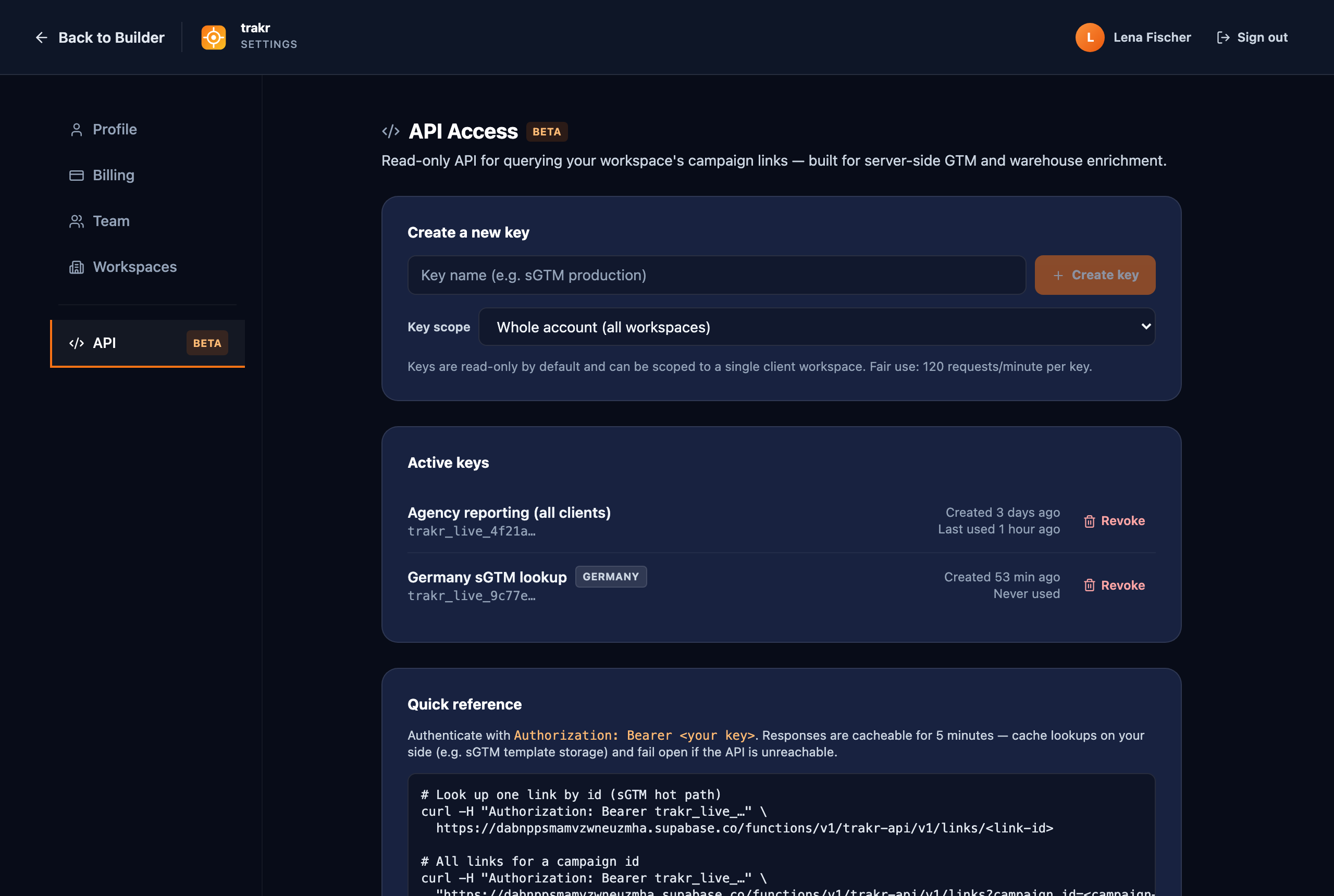
Authentication uses account-level API keys managed in the app under Settings → API. Creating and revoking keys requires a Pro account and the owner or admin role.
Key scope: account-wide by default, or scoped to one workspace. A standard Trakr API key reads every link your account holds, across all client workspaces if you use them. If you run client workspaces, you can instead scope a key to a single workspace when you create it (Settings → API → Key scope): a scoped key reads and writes only that workspace, resolves that workspace's default configuration first, and stops working if the workspace is archived or paused for payment. Hand a client-facing system a scoped key so it can never see another client's data; keep account-wide keys for your own infrastructure.
- Open Settings → API, give the key a name that says where it will live (for example
sGTM production), and click Create key. - Copy the key immediately. It starts with
trakr_live_and is shown exactly once: Trakr stores only a hash, so nobody (including us) can display it again. - Store it in your secrets manager, never in client-side code. The key grants read access to your whole account's link history.
Send the key on every request in the Authorization header:
Authorization: Bearer trakr_live_your_key_hereLost a key? Revoke it on the same page (it stops working immediately) and create a new one. Your account can hold up to 10 active keys, so rotation without downtime is easy: create the new key first, switch your systems over, then revoke the old one.
Endpoints
Base URL:
https://dabnppsmamvzwneuzmha.supabase.co/functions/v1/trakr-api| Endpoint | What it returns |
|---|---|
GET /v1/links/{id} | One link by its Trakr ID. The exact-lookup path: use this when your URL carries a per-link identifier. |
GET /v1/links | Links matching the query filters, newest first. Filters: campaign_id, utm_source, utm_medium, batch_id, since, until (ISO dates). Pagination: page (from 1) and per_page (default 50, max 100); the response includes has_more. |
GET /v1/campaigns | Campaign summaries: each distinct campaign ID with its campaign name, link count, sources, mediums, and first/last created dates. limit caps the list (default 100, max 500). |
GET /v1/config | The default configuration for your key's scope: { "data": { "id", "name", "mode", "updated_at", "config" } }, where config is the full configuration document your team built in the app: field IDs, syntax structures and separators, channel definitions, custom parameters. A workspace-scoped key resolves its workspace's default first and falls back to the account default; account-wide keys resolve the account default. When the resolved default is workspace-owned, the response also carries its workspace_id. Requires a shared default to be starred (the star in the config dropdown), or the endpoint answers 404 with instructions. |
GET /v1/workspaces | Your workspaces: { "data": [ { "id", "name", "created_at", "archived", "blocked" } ] }. A workspace-scoped key sees only its own workspace. Use the ids here to scope configurations and file links. |
Example: fetch all links for one campaign ID.
curl -H "Authorization: Bearer trakr_live_..." \
  "https://dabnppsmamvzwneuzmha.supabase.co/functions/v1/trakr-api/v1/links?campaign_id=nl-summer26-social&per_page=10"
The write API
Everything a marketer does in the builder, your systems can do through the same governance layer: the write endpoints run every request through the exact validation, syntax rules, Auto ID minting, and GA4 channel prediction the app itself uses. Every Trakr API key carries the write permission; there is nothing to request and nothing extra to pay.
| Endpoint | What it does |
|---|---|
POST /v1/links | Create one link. Body: { "field_values": { ... }, "source": "...", "medium": "..." }, where field_values is keyed by the configuration's field IDs (discover them via GET /v1/config or GET /v1/configs/{id}). Two optional extras: config_id generates against that specific configuration instead of the scope default, and workspace_id files the link in that workspace. When you pick a workspace-owned configuration, the link is filed in its workspace automatically, so the client team sees it in their library. Empty Auto ID fields are minted server-side. Returns the created link in the same shape as GET /v1/links, status 201. |
POST /v1/batches | Bulk creation: { "name": "...", "rows": [ ... ] } with up to 500 rows, each shaped like a single-link body. config_id and workspace_id work exactly as on single links and apply to the whole batch. Validation is all-or-nothing: one invalid row rejects the whole batch with per-row errors and nothing is created. Returns the batch plus every created link. |
PATCH /v1/links/{id} | Edit a link: the changes merge onto its stored form state and the URL regenerates through the full pipeline, using the configuration that originally built the link when it is still available (pass config_id to regenerate under a different one). The link keeps its ID, its Auto ID, and its workspace. Returns the updated link. |
DELETE /v1/links/{id} | Soft delete: the link moves to Recently deleted with the same 7-day restore window the app has. There is no hard delete via the API. |
DELETE /v1/batches/{id} | Soft-deletes the batch's links. The batch record itself remains as an empty container. |
GET /v1/batches | List your batches, newest first, paginated like GET /v1/links. |
POST /v1/workspaces | Create a workspace: { "name": "..." }. Works within the number of workspaces your account has purchased; at the ceiling the request answers workspace_limit_reached with your current count and maximum (buying more stays in the app under Settings → Workspaces). Requires an account-wide key. |
Changed on 2026-07-14: the landing page URL follows your configuration. Whether baseUrl is required now comes from the configuration document, like every other field. Configurations that set the Landing Page URL to Optional or Off (a Syntax Builder global setting) accept requests without it and generate a bare parameter string, such as utm_id=abc123, ready for a Google Ads Final URL suffix; a configuration setting can add a leading question mark. For such links base_url is omitted from responses and full_url carries the parameter string. Nothing changes for existing configurations, where the URL stays required, and a provided baseUrl must still be a valid http(s) URL. Two companions shipped the same day: link responses now carry field_values, the per-field breakdown described in the response table below, and empty optional fields now always keep their position in generated values, as a doubled separator (a_b__d) or, with the Syntax Builder's Empty Field Placeholder setting, as a readable token (a_b_none_d). The value's split count never changes, so positional consumers can trust their indexes. And utm_content now appears in URLs only when it has a value: the GA4-required trio (utm_source, utm_medium, utm_campaign) stays in every classic-mode URL, while content follows your configuration like every other optional parameter.
Idempotency: required on every write
Every write must carry an Idempotency-Key header (any string up to 200 characters, unique per logical request). Retrying with the same key and the same payload returns the original response without creating anything twice; the same key with a different payload is refused with 409. Keys expire after roughly 24 hours.
Write limits
Writes are limited by generated URLs, not requests: 60 URLs per minute per key (a batch of 50 counts as 50), and generated URLs also count against the shared daily pool. Exceeding a limit returns 429 with a Retry-After header; retry with the same Idempotency-Key.
Configuration management
The write API also covers the governance layer itself, so an integration can stand up or maintain a team's tagging rules programmatically, at both levels: account-level configurations (shared with every workspace) and workspace-owned configurations (shared with one client workspace only). API-created configurations default to shared visibility so the whole team sees them. A private configuration belonging to another user stays invisible to your key and cannot be changed through the API. Every persisted change runs through the same structural validation the app enforces; a document with errors is refused with the full list, and warnings come back alongside the saved result.
| Endpoint | What it does |
|---|---|
GET /v1/configs | List the configurations your key can see (shared ones plus the key creator's own), without the full documents. Workspace-owned rows carry their workspace_id; account-level rows omit it. |
GET /v1/configs/{id} | One configuration including its full document, in the same shape GET /v1/config uses. |
POST /v1/configs | Create a configuration: { "name": "...", "config": { ... }, "visibility": "shared", "default": false }. Add "workspace_id" to create it workspace-owned (the workspace must exist and be live), and "cloned_from" to record which configuration it was copied from. Setting "default": true makes it the default of its own scope: an account-level row becomes the account default, a workspace-owned row becomes that workspace's default, replacing only that scope's previous default in the same request. |
PATCH /v1/configs/{id} | Update the name, visibility, document, or default flag. A configuration's scope is fixed at creation (to move one into a workspace, read its document and POST a copy with workspace_id and cloned_from). Making a configuration private clears its default flag, and a private configuration cannot become a default. |
POST /v1/configs/validate | Dry run: validates a configuration document without saving anything and returns { "valid", "errors", "warnings" }. This is the one write endpoint that needs no Idempotency-Key, because it changes nothing. |
What to expect: responses and schema
Every response is JSON. Single lookups return { "data": { ...link } }, lists return { "data": [ ...links ], "page": 1, "per_page": 50, "has_more": false }. A link object can carry these fields. Fields without a value are omitted entirely, so check for key presence rather than comparing against null:
| Field | Meaning |
|---|---|
id | Trakr's unique ID for this link. Stable, never reused. |
created_at | ISO timestamp of generation. |
base_url, full_url | The landing page and the complete tagged URL. |
utm_source, utm_medium, utm_campaign, utm_content, utm_term | The five classic UTM values as generated. |
campaign_id | The generated utm_id value. This is the lookup key for the sGTM pattern below. |
source_platform, creative_format, marketing_tactic | The extended GA4 parameters, when your configuration uses them. |
country, campaign_description | Context captured in the builder. |
ga4_channel | The GA4 channel Trakr predicts for this source/medium pair. |
custom_params | Object with your custom parameters and their values. |
batch_id | Set when the link came from a bulk generation; all rows of one batch share it. |
config_id | The configuration that generated this link. Edits regenerate under the same configuration while it exists. |
field_values | The link's building blocks keyed by field name, exactly as entered: { "productName": "aj+", "country": "dach", "productPhase": "", ... }. This is the machine-readable form of the link. An empty string means the field was part of the link and left unset (the one place empty values are kept on purpose); a missing key means the field never entered this link. Read values from here by name instead of splitting utm_campaign by position. |
Example response for a single link:
{
  "data": {
    "id": "7c9e6679-7425-40de-944b-e07fc1f90ae7",
    "created_at": "2026-07-09T10:15:00.000Z",
    "base_url": "https://example.com/summer",
    "full_url": "https://example.com/summer?utm_source=facebook&utm_medium=cpc&utm_campaign=nl.summer26&utm_id=nl-summer26-social",
    "utm_source": "facebook",
    "utm_medium": "cpc",
    "utm_campaign": "nl.summer26",
    "utm_content": "carousel.a",
    "campaign_id": "nl-summer26-social",
    "country": "nl",
    "campaign_description": "Summer 2026 launch",
    "ga4_channel": "Paid Social",
    "custom_params": {}
  }
}
Changed on 2026-07-12: unconfigured fields are now omitted. Responses previously carried every field, with null or "" for values your configuration never set ("utm_term": null, "source_platform": null, and so on). They are now left out entirely. If your integration reads fields unconditionally, switch to key-presence checks. Cached responses served the old shape for up to 5 minutes around the cutover.
Errors
Errors follow one shape: { "error": "code", "message": "human readable" }. The message always says what to do next. Every code you can meet:
| Code | HTTP | Meaning and what to do |
|---|---|---|
unauthorized | 401 | Missing, unknown, revoked, or expired key. Check the Authorization header and the key's state on Settings → API. |
forbidden | 403 | The account's subscription is inactive, the key's workspace is paused or archived, or a workspace-scoped key called a configuration write (those need an account-wide key). The message names the exact reason. |
unknown_endpoint | 404 | The path is not a Trakr API endpoint. The message lists every valid endpoint for the method you used. |
not_found | 404 | No such link, batch, or configuration within your key's scope. Inaccessible rows answer exactly like unknown ids. |
method_not_allowed | 405 | The endpoint exists but not for this HTTP method (for example GET on /v1/configs/validate, which is POST only). |
invalid_json | 400 | The request body is not valid JSON. |
idempotency_key_required | 400 | Writes need an Idempotency-Key header (1 to 200 characters, unique per logical request). |
idempotency_conflict | 409 | The same Idempotency-Key was already used with a different payload. Use a fresh key for a different request. |
request_in_flight | 409 | A request with this Idempotency-Key is still being processed. Wait for the Retry-After and retry with the same key. |
outcome_unknown | 409 / 500 | An earlier attempt with this key started executing but its result could not be recorded. Verify via GET before doing anything else; retrying with the same key returns this status, and a NEW key is only safe after you confirmed the write did not apply. |
validation_failed | 422 | The request failed the same validation the app enforces. details (or per-row rows on batches) lists every problem. |
batch_too_large | 422 | A batch can create at most 500 links per request. Split the rows and send multiple batches. |
no_default_config | 422 | No default configuration is set for the key's scope. Star a shared configuration as the default in the app (or via PATCH /v1/configs/:id), pass an explicit config_id, then retry. |
config_invalid | 422 | The resolved configuration fails validation and cannot generate links. POST /v1/configs/validate shows the errors. |
config_not_found | 422 | The config_id you passed does not name a configuration this key can use. GET /v1/configs lists the usable ones. |
workspace_limit_reached | 422 | Your account already holds its purchased number of workspaces. Purchase another under Settings → Workspaces in the app, then retry. |
link_not_editable | 422 | The link predates stored form state and cannot be edited via the API. Recreate it instead. |
rate_limited | 429 | A fair-use window is full. Wait for the Retry-After header and retry; on writes, retry with the SAME Idempotency-Key. |
temporarily_unavailable | 503 | The idempotency store had a hiccup. Retry with the same Idempotency-Key after the Retry-After. |
internal_error | 500 | Something failed on our side before anything was written. Retry with the same Idempotency-Key; if it persists, write to support@trakr.studio. |
Rate limits and caching
Fair-use limits protect the service for everyone:
- 120 requests per minute per key. Exceeding it returns 429 with
Retry-After: 60. - 100,000 requests per day per account across all keys. The daily pool is shared by the whole account, including workspace-scoped keys.
Responses are built to be cached. Successful lookups carry Cache-Control: private, max-age=300 and an ETag; send If-None-Match and you get a body-less 304 when nothing changed. Misses (404) are cacheable for 60 seconds. Campaign data barely changes after launch, so a 5-minute cache on your side turns thousands of hits into a handful of lookups. If your genuine volume outgrows the limits, please contact support@trakr.studio for higher rate limits. We want you to get the most out of the API, and we will find limits that fit your volume.
The pattern: campaign IDs + server-side GTM
This is the use case the API was built around. The problem it solves: long UTM strings in every ad URL are fragile, leak your campaign taxonomy into the public URL, and drift when someone edits by hand. The alternative:
- Marketing builds every campaign link in Trakr, as usual. The configuration includes the
utm_idparameter (an Auto ID field, or your own composed structure), so every link carries an ID. - Tracking URLs carry only the ID. Instead of the full parameter set, the ad URL ships with just
utm_id=nl-summer26-social. Short, stable, and nothing to mistype. - Server-side GTM enriches the hit. When a tagged hit arrives, your sGTM container reads the ID, calls
GET /v1/links?campaign_id=nl-summer26-social&per_page=1, takesdata[0], and writesutm_source,utm_medium, and whatever else you need onto the GA4 event before it goes out.
The one design rule: the ID in the URL must identify a single link, not a whole campaign. A campaign in Trakr usually has one link per channel, all sharing the campaign name but each with its own source and medium. If the URL only says "summer campaign", the API cannot tell whether that click came from Paid Social or Email. Two ways to get there: add an Auto ID field to your Campaign ID structure in the Syntax Builder (Trakr then mints a unique 8-character ID for every link, no naming discipline required), or compose the structure from a campaign field plus a channel field (for example nl-summer26-social, nl-summer26-email). Either way the lookup is exact. The full setup, including the Lean URL profile, is on the Campaign IDs & Lean URLs page.
Lean URLs: emitting only the ID
The step-by-step marketing-side guide lives on the Campaign IDs & Lean URLs page; the short version:
Once your sGTM lookup is live, you can go all the way: in the Syntax Builder's Global Settings, switch URL Output from Full to Lean. Lean URLs carry only the Campaign ID (utm_id) plus the custom parameters you keep for client-side consumers (a CRM reading its parameter from the landing URL, for example). Source, medium, campaign, and content stay stored in Trakr and reach GA4 through the API lookup. A lean URL looks like this:
https://example.com/summer?utm_id=k7f3a2cq&mycrmparameter=dach_launch_awarenessOne warning that matters: Lean only works when your tracking runs through server-side GTM with the lookup in place. Without it, GA4 receives hits with no source or medium at all. Trakr shows this warning when you switch, and flags a Lean config whose Campaign ID structure is empty.
Using stape's Supabase Lookup template
If your sGTM container runs on stape, their Supabase Lookup variable template gets you most of the way. Two notes from a production integration:
- One line needs adjusting for Trakr's endpoint. In the template's
template.js, line 29 builds the request URL for Supabase's table REST pattern; point it at the path instead:const url = baseUrl + '/' + data.tableName;. Then use the Trakr base URL above asbaseUrland the endpoint path (for examplev1/links?campaign_id=...) as the table name field. - Pair it with stape's Event Generator Tag so the lookup fires once per event instead of once per variable read: fewer requests, and the enriched values stay consistent within one event.
Two habits for anything in the tracking path
- Cache lookups in your sGTM template for about 5 minutes, keyed by campaign ID. The response headers support this, and it keeps you far below the rate limits at any traffic level.
- Fail open. If the API call fails or times out, send the GA4 event anyway with the campaign ID you have. A hit with partial attribution beats a lost hit. Never make your tag wait indefinitely on any external call, ours included.