What this is
MCP (the Model Context Protocol) is the standard way to give an AI assistant safe, structured access to a product. The Trakr connector is hosted by us. You add it to Claude by pasting one address, sign in with your Trakr account, and approve. From then on Claude works with your account through 16 well-described tools. Claude never guesses at URLs or edits text files: it calls the Trakr API, and the API enforces your tagging rules on every single request.
Things you can say once it is connected:
- "Here is my client structure as a CSV. Create a workspace per client and install each one's campaign syntax and GA4 channels as that workspace's default configuration."
- "Build the summer launch links for the France workspace: paid social, email, and display, using their configuration."
- "Which campaigns ran last month, and through which channels?"
- "Clone our house configuration into the new client's workspace and change the campaign separator to hyphens."
You do not install anything and you do not create an API key. You paste one address into Claude, sign in, and approve. Trakr creates a dedicated key for the connection and you can revoke it any time under Settings → API.
What you need
- A Trakr Pro account (the connector is part of Pro).
- To sign in as a workspace owner or admin. The connection is created under your account, and setting it up is limited to owners and admins. If you are a member, an admin on your team can connect it.
- A Claude client that supports custom connectors, such as Claude on the web or desktop. You add the connector under Settings.
Connect it
- In Claude, open Settings → Connectors and choose Add custom connector.
- Paste this address and confirm:
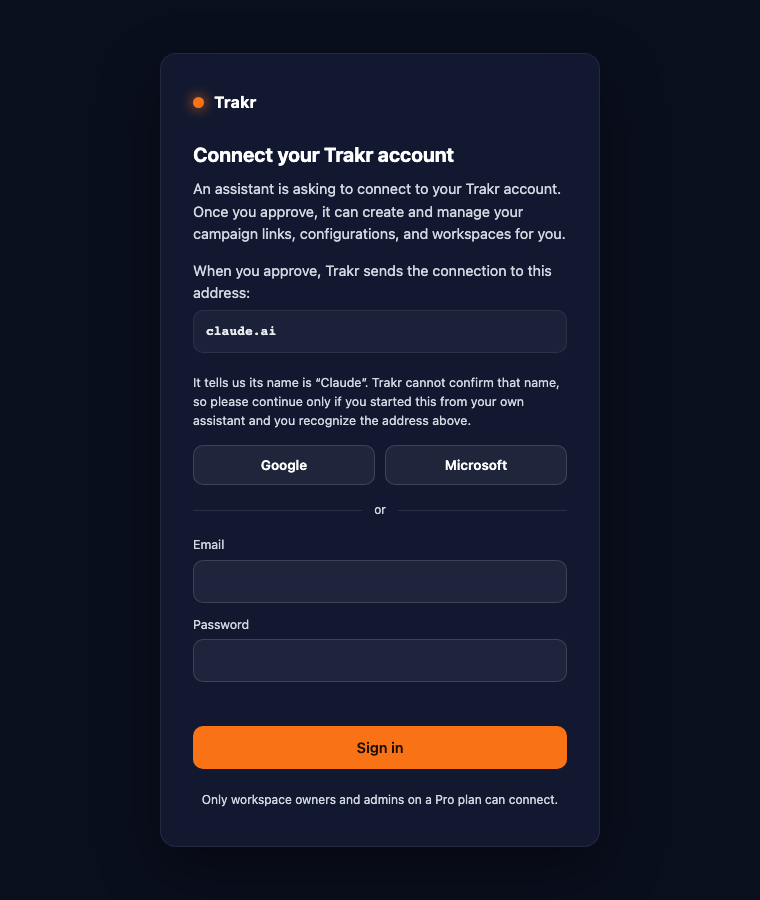
https://mcp.trakr.studio/mcp - Claude opens the Trakr sign-in screen. Sign in with Google, Microsoft, or your email and password.
- Check the screen. It shows the address Claude will use and what the assistant will be able to do. Click Approve.
- That is it. Trakr creates a dedicated key for this connection, and Claude shows the Trakr tools. You can start asking right away.
The key for this connection appears under Settings → API named after the Claude connector, with your email. Revoke it there any time to disconnect; revocation is immediate.
What Claude can do
| Area | Tools | In plain words |
|---|---|---|
| Workspaces | list_workspaces, create_workspace | See your client containers and create new ones, within the number you have purchased. |
| Configurations | get_config, list_configs, create_config, update_config, validate_config | Read, install, and maintain tagging rules at account level or per client workspace, including a dry-run validation that saves nothing. The configuration document carries the global settings too: the Landing Page URL mode, the Empty Field Placeholder, separators, and the URL output profile all travel with it, so Claude can read and change them in conversation. |
| Links | create_link, create_batch, get_link, search_links, update_link, delete_link | Generate single links or up to 500 at once through your full syntax rules, against a chosen configuration, filed in the right workspace. Configurations with the Landing Page URL set to Optional or Off work too: the output is then a bare parameter string. Reads return every link's values by field name in field_values, so the assistant never has to take a campaign string apart. Deletes are the app's 7-day soft delete. |
| Overviews | list_campaigns, list_batches, delete_batch | Campaign summaries and bulk history for reporting questions. |
A worked example: set up an agency account from a CSV
Say you manage three clients and keep their tagging specs in a spreadsheet: one row per client with their campaign syntax, separators, and channel list. Attach the CSV and say:
You: Here is my client structure. Create a workspace for each client, and install each client's campaign syntax and GA4 channels as that workspace's default configuration. Validate everything before saving.
Claude: I read the CSV: Germany, France, and Netherlands, each with their own separator and channel set. I will create three workspaces, compose each configuration, dry-run validate it, then save it as that workspace's starred default. Creating the workspaces now…
Claude: Done. Three workspaces created. France's configuration uses hyphens as the campaign separator and 12 channels; validation passed with one warning about an unused field, which I removed. All three defaults are starred. Want me to generate a test link per client to verify?
From then on, campaign requests are one sentence: "Build the Q3 launch links for France: paid social, email, display." Claude reads France's configuration, fills the required fields, and the links land in the France workspace where that client's team sees them in their Library.
If a request violates your rules, Trakr refuses it with the exact list of problems, and Claude reads that list and fixes its own request. Your governance holds even when nobody is typing in the app.
Prompts to start with
Copy any of these into Claude once the connector is active. They cover the whole surface: workspaces, configurations, channels, custom parameters, global settings, link generation, and reporting.
Create a workspace called Acme Corp and set up its default configuration with hyphens as the utm_campaign separator and underscores for utm_content.Add a custom parameter called account_id to my default configuration and make it a reference field that mirrors the campaign description from utm_campaign.In the Acme Corp workspace, add a channel called Retail Media that matches source criteo or citrus with medium cpc.Turn on the Empty Field Placeholder on my default configuration, set it to "na", and run the validation dry run before saving.Build a link for the France workspace: Paid Social channel, summer-sale campaign, source instagram, story placement.Generate 20 links for our Q3 email campaign against the house configuration, one per audience segment in this list: [paste your list].Which campaigns ran through Paid Search Brand last month, and how many links does each have?Clone the house configuration into the new client workspace, then switch its campaign separator to hyphens and set the Landing Page URL to Optional.Show me the Netherlands workspace configuration: channels, custom parameters, and every global setting.Boundaries: what it deliberately cannot do
- No purchasing. Claude can tell you that you reached your workspace limit. Buying more workspaces or seats always happens in the app, under Settings.
- No hard deletes. Deleting through the API is the same soft delete the app has, with the 7-day restore window in Recently deleted.
- One dedicated key you control. The connection uses a single key that Trakr creates for it, scoped to your account. You revoke it any time under Settings → API, and the connection stops at once.
- Fair-use limits apply like on any API traffic: 120 requests per minute per key, 60 generated URLs per minute on writes, 100,000 requests per day per account. The connector waits and retries politely when it hits a window.