What a configuration is
Everything you build in the setup wizard lives in one configuration: the parameter syntax (which fields compose utm_campaign, utm_content, and the rest, plus separators), the field definitions (types, options, required flags), and your channel definitions. The builder always runs on exactly one active configuration. Change the configuration and every future URL follows the new rules; URLs you already generated stay as they were.
My Configs: saving and switching
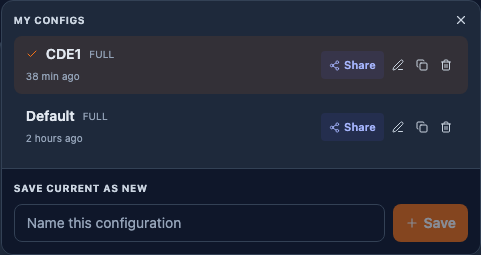
Signed in, the builder header shows a config dropdown. It lists your saved configurations under My Configs with the active one marked. From here you can:
- Save the current setup as new: type a name and save. Free accounts hold one named configuration; Pro removes the limit.
- Switch: click any row to load it. The builder and setup wizard immediately follow that configuration.
- Rename (pencil), Duplicate (Pro), and Delete. Delete asks for confirmation and is permanent; it does not touch URLs already in your history.
Each row also shows when it was last modified, and cloned rows show which configuration they came from.
Sharing with your team
Workspace admins see a Share button on their own configs. Sharing makes the configuration visible to every member of your workspace:
- Your row gets a Shared pill so you can always see what the team can see. Unshare takes it private again (teammates lose access; the button asks first).
- Teammates find it in their dropdown under Team Configs and can load it read-only. The setup wizard shows them a "Shared config, read only" badge and a Clone to Edit button instead of Save, so nobody silently rewrites the team standard.
- Workspace admins are the exception: they can edit shared configs, so a governed setup stays maintainable by more than one person.
The company default (the star)
On shared configs, admins can toggle a star: the company default. Exactly one configuration per team can hold it. New team members get the default loaded automatically on their first visit to the builder, which is how you make sure a new hire's very first URL already follows your naming standard.
Recommended team pattern: one admin owns the master configuration, shares it, and stars it as the company default. Members build URLs with it and clone it only when they genuinely need a personal variant.
Account-level and workspace-level configurations
If your account uses workspaces (one per client or country), configurations live on two levels:
| Level | Who sees it when shared | How you create it |
|---|---|---|
| Account level | Every workspace. This is your house tagging standard. | Save the configuration while working at account level (no workspace selected in the header switcher). Share it, and star it as the default. |
| Workspace level | Only that workspace. | Switch into the workspace with the header switcher, then save, share, and star the configuration there. |
The level is decided by where you are when you save, and it is fixed from then on; to bring a configuration to another level, clone it there. When a workspace has its own starred default, it wins over the account default for everyone working in that workspace; workspaces without one simply use the account default. This way one shared account-level configuration governs all clients until a client genuinely needs their own rules.
Step by step for a client-specific configuration:
- Make sure you are a member of the client's workspace (Settings → Workspaces).
- Switch into it with the workspace switcher in the app header.
- Build or adjust the configuration, save it in the config dropdown, Share it, and star it as the default.
Reconfigure Setup
The Reconfigure Setup button in the builder returns you to the setup wizard with the active configuration loaded. You are editing that configuration, not starting over: adjust the syntax, fields, or channels and finish, and Save updates the same saved row. Generated history is never modified by configuration changes, although the CSV export's per-field columns follow the currently active configuration.
Anonymous use
You can configure and build without an account; the configuration is kept in your browser's local storage. It survives reloads on that browser but not a cleared cache or another device. Signing up moves it into your account, and the save-your-work banner in the builder exists exactly for that step.